Nightfall Detection Rules: How to Increase the Confidence of a Custom RegEx Detector
Last updated: January 29, 2026
Purpose
To increase the confidence of a custom RegEx detector and have the option to use "Very Likely" confidence
Environment
Nightfall Web Console: Detection
Detectors
Resolution
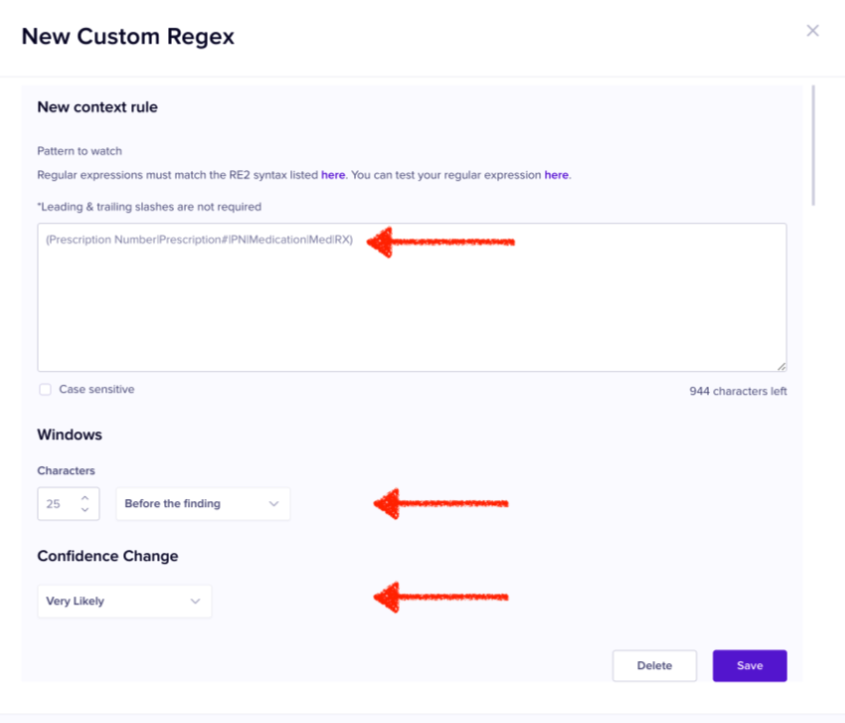
To increase the confidence for of a custom Detector, include a context rule that captures words or phrases commonly found near the RegEx match. This up-weights the finding and reduces false positives.
Example
Prescription Numbers typically follow the format RX-###-YYYY-## and often appear near keywords such as “Prescription Number,” “Prescription#,” “PN,” “Medication,” “Med,” or “RX.”
In this case, use:
• Create a regex detector:
RX-\d{3}-(19|20)\d{2}-\d{2}
• Add a context rule that looks for:
(Prescription Number|Prescription#|PN|Medication|Med|RX)
within 25 characters of the detected entity and changes the Confidence to Very Likely.